
SEO Checklist for Small Businesses
Search engine optimisation for a small business is mostly a sequence of unglamorous, finishable tasks. This checklist covers the work that reliably matters — understanding what people search for, writing pages that answer it, and making sure search engines can read and trust your site.
Before you start
SEO compounds slowly. Meaningful movement usually takes months, and no one can promise a particular position — search results are ranked by systems you do not control and competitors you cannot see planning. What you can control is whether your pages deserve to rank: clear answers, readable structure, and a site search engines can crawl.
1. Keyword research
- List the services or products you sell, in the words customers use — not internal jargon.
- Expand each with modifiers: "near me", city names, "cost", "vs", "for beginners", "example".
- Use Google autocomplete, "People also ask" and related searches as a free starting point.
- Sort terms into three buckets: money pages (ready to buy), comparison, and informational.
- Prefer specific terms with clear intent over broad terms with huge volume.
2. Match search intent
Search the term yourself and look at what already ranks. If the first page is full of product listings, a blog post is unlikely to break in — and vice versa. Match the dominant format:
| Intent | Example query | Page you need |
|---|---|---|
| Informational | "how to write ad copy" | Guide or tutorial |
| Commercial | "best crm for small business" | Comparison or roundup |
| Transactional | "buy standing desk online" | Product / category page |
| Navigational | "dm ai assist login" | The specific page itself |
3. Title tags
- One unique title per page, roughly 50–60 characters so it is not truncated.
- Lead with the primary term, then a differentiator or brand name.
- Describe what the page is, not what you wish it ranked for.
4. Meta descriptions
- Around 150–160 characters, unique per page.
- Treat it as ad copy: say what the reader gets, and include the term naturally.
- It is not a direct ranking factor, but it affects whether people click.
5. Headings and page structure
- Exactly one H1 that states the page topic.
- H2s for the main sections, H3s for sub-points — never skip levels for styling reasons.
- Answer the core question in the first 100 words; do not bury it under a long preamble.
- Use short paragraphs, lists and tables so the page is scannable on a phone.
6. Internal links
- Link every new page from at least one existing page — orphan pages are found slowly.
- Use descriptive anchor text ("SEO checklist") rather than "click here".
- Point supporting articles at the money page they support.
- Keep important pages within three clicks of the homepage.
7. Image optimisation
- Descriptive file names:
steel-window-frames-install.jpg, notIMG_4821.jpg. - Alt text that describes the image for someone who cannot see it.
- Compress and serve modern formats; set width and height to avoid layout shift.
- Lazy-load images below the fold.
8. Technical basics
- The site loads over HTTPS and one canonical hostname (pick www or non-www and redirect the other).
- Every page has a self-referencing canonical tag.
- A sitemap.xml lists your public pages; robots.txt does not block anything you want indexed.
- Mobile layout works with no horizontal scrolling.
- Core Web Vitals are acceptable — largest contentful paint under about 2.5 seconds.
- No duplicate pages competing for the same term.
- Structured data where it fits: Organization, LocalBusiness, Product, FAQPage, Article.
9. Local SEO
- Claim and complete your Google Business Profile: categories, hours, service area, photos.
- Keep name, address and phone number identical everywhere they appear.
- Create a page per location or per service-area if you genuinely serve them.
- Ask satisfied customers for reviews — never buy or fabricate them.
- Get listed in credible local directories and industry associations.
10. Search Console
- Verify the property and submit your sitemap.
- Use the URL Inspection tool after publishing important pages.
- Watch the Pages report for crawl and indexing errors.
- Use the Performance report to find queries where you rank 8–20 — those pages usually need a better answer, not a new page.
11. Measurement
Track a handful of numbers monthly: impressions and clicks in Search Console, indexed page count, organic sessions in your analytics, and enquiries attributed to organic search. Compare quarter on quarter rather than week on week; seasonality and algorithm updates make short windows noisy.
Quick checklist
- Keyword list sorted by intent.
- One page per intent, no cannibalisation.
- Unique title and meta description on every page.
- Single H1, logical heading order.
- Internal links in and out of every page.
- Compressed images with real alt text.
- HTTPS, canonical tags, sitemap, clean robots.txt.
- Google Business Profile complete (if local).
- Search Console verified and monitored.
My practical SEO audit workflow
When I look at a small site, I work through it in this order. The order matters: there is no point improving titles on pages Google cannot index.
- 1. Search Console first. Check the Pages report for excluded URLs, then look at which queries already bring impressions. Existing near-miss queries are usually the fastest wins.
- 2. Indexability. Confirm robots.txt is not blocking anything important, that canonicals point where you expect, and that no live page carries a stray noindex.
- 3. Titles and H1s. One H1 per page. Check for duplicate titles across pages — duplicates almost always mean two pages competing for the same query.
- 4. Search intent. Search each target query and look at what ranks. If the results are comparison pages and yours is a product page, the format is wrong, not the copy.
- 5. Internal links. Make sure every important page is reachable from a relevant page with descriptive link text, not just from the footer.
- 6. Images. Descriptive alt text, sensible file sizes, and lazy loading below the fold.
- 7. Technical issues. Mobile rendering, broken links, redirect chains, and slow-loading pages — in that order of impact.
- 8. Conversion path. Finally, check that a visitor who lands on the page can actually do the thing you want: contact, buy or book, without hunting for it.
Write the findings down as a short list with one owner and one date each. An audit that produces forty observations and no assigned fixes changes nothing.
Practical workflow with DM AI Assist
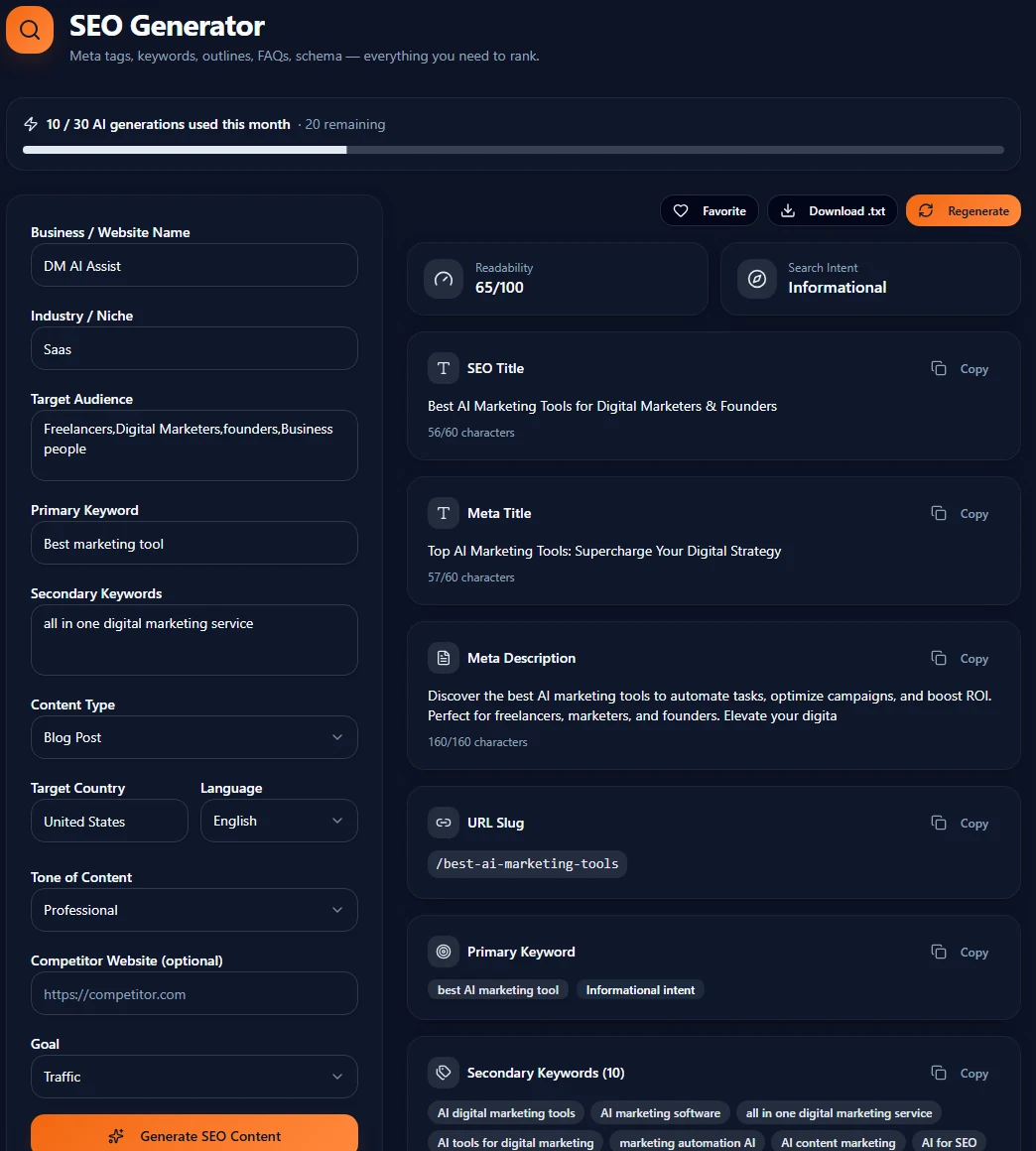
For the on-page items in this checklist, the SEO Generator in DM AI Assist drafts keyword-focused meta titles, descriptions and page outlines from a short brief. Generate three variants per page, then edit them against the checklist above — the tool handles the first draft, your judgement handles accuracy and search intent.
Put this into practice
DM AI Assist turns a short brief into publish-ready marketing content you can edit and reuse.
Abhinay Adla — Creator of DM AI Assist. About the author